Escaping the Walled Garden: How I Replaced My iPhone with a Tiny 3" Phone
If you want to skip the story, the install guide and known issues are further down.
This story starts with me being annoyed that I was trapped in the iPhone buying cycle. Since I was a young teen I had learned to associate the iPhone with style and having money. The famous blue text bubble, and the face of disgust my tween friends made when they received a green bubble (ew, right?).
My first phone was a Samsung S7710 Galaxy Xcover 2, with a back panel you could pop off and a battery you could swap easily. I quickly learned that this phone was not considered cool, so when I was gifted an iPhone 6s for my fourteenth birthday I was elated. It lasted a long time: I only upgraded in 2023, as a 21-year-old, to an iPhone 15 Pro that cost me around 9,000 DKK (about 1,300 USD).
The phone was a welcoming upgrade, fast, and I spent the first evening I had it taking 4K images in RAW (never used that again, it is mostly a gimmick as I’m not a photo enthusiast).
My issue with the iPhone is that it is totally unrepairable and, to be honest, it is super expensive for a broke university student. It might be worth it for some people: it has a powerful processor and a very good camera. But the whole reason I got into the Apple walled garden was that as a kid I just had to have one. In retrospect, I was blinded by the flashiness of the iPhone and what it representedIf I’m being completely honest with myself, I’m of course still very much guided by what my belongings represent, since I got the iPhone I have simply turned very much anti-bigtech and anti-consumerism so now a small Free-Software phone is what appeals to me.. Now, as a young (broke) adult, I have found other ways of creating self-worth than the things I ownOf course aside from the fact that I’m branding myself with this small phone, I see the double standard…. So, do I need an iPhone? According to my usage data, this is what I mostly use my phone for:
- Web surfing (news / Wikipedia / etc.)
- Podcast & music playback
- Messaging & calls
- Scrolling YouTube Shorts / Facebook & Instagram Reels / mindless scrolling
- Sudoku
- Navigation
And there are a couple of essential things I use it for that have no physical alternative:
- Checking into my local gym with the phone’s NFC chip
- Carrying my public transport pass
So I had an idea. Instead of buying the most expensive phone out there, one you can play AAA games onYou can play freaking Fortnite on these things, what if I found the cheapest device that covers the needs above (and perhaps discourages heavy social media scrolling by having a small form factor)?
I landed on the Unihertz Jelly Star. It is tiny, with a 3-inch screen, while still being a capable smartphone that runs Android 16. It even doubles as a remote control because it has an infrared emitter. It had all the capabilities I was actually using on the iPhone while only costing 200 USDIt even has 256 GB of storage, the iPhone 15 Pro I have has 128 GB. The big thing it is missing is a camera on par with the iPhone’s. However, with a used second-hand camera for 200 USD I can take even better pictures than the iPhone ever could (it’s not about the megapixels, it’s the sensor!).
Philosophically, going from one device to two (phone and camera) is perhaps not so bad. We all know the 2007 keynote where Steve Jobs presented the original iPhone: “an iPod, a phone, and an internet communicator” in one device. Super handy, right? The issue for me is that the modern smartphone is filled with software trying to grab my attention, so when I want to snap a picture I end up scrolling a bit too. In the physical world I separate the places I work (uni, library, office) from the places I relax (bedroom, couch). If I work in the bedroom my head is in relax mode, and I don’t relax at work. Maybe the device I use to take pictures of my loved ones, concerts and nature should likewise be split from the attention-hungry device with e-mails, notifications and reels. Food for thought at least.
So the day comes when I receive the Jelly Star. Impressed by the small size, I boot it up and I’m met with the Android 16 UI, which looks okay. Then I see the preinstalled software: YouTube, Google, etc. It is a Google operating system after all. But I don’t want YouTube on my device. I reach for the delete button and I’m met with “Software that is preinstalled cannot be deleted”. What?! How dare they? Next, as I swipe up on the screen, Gemini activates and starts analyzing what’s on my screen. Actually, every time I swipe up Gemini activates. I don’t know if it’s a bug or my fat thumb, but it is extremely annoying. Quickly all hope disappears that I could have a small, cheap, lean device in 2026.
After a quick web search I find out that you can install LineageOS, an open source version of Android maintained by volunteers, without Google’s apps and services. The Jelly Star isn’t officially supported, but there is a workaround: a GSI (Generic System Image). That is a one-size-fits-all build of Android that replaces only the system partition and runs on top of whatever the manufacturer put on the phone. So I flash MisterZtr’s LineageOS GSI onto the Jelly Star, on top of the stock firmware.
The phone is way cleaner afterwards, and I can have the apps I want with no intruding Gemini or Google. However, as I connect my Bluetooth headphones I realise that Bluetooth playback is broken. Not just that, the NFC chip is no longer working either. That’s the catch with a GSI: it doesn’t know anything about this specific phone.
So I’m at a dead end. Either I have a lean phone that can’t play music and can’t get me into my gym, or I have a phone full of -annoying- Google bloat that I can’t delete.
But what if there’s a third way?
The journey begins: a proper port
What if, instead of a generic image, I built LineageOS specifically for the Jelly Star? That can’t be that difficult, right?
The usual way to do that starts with the kernel source, the Linux code at the bottom of Android that talks to the hardware. Linux is licensed under the GPL, so anyone who ships it has to publish their source code on request. So I asked Unihertz for it.
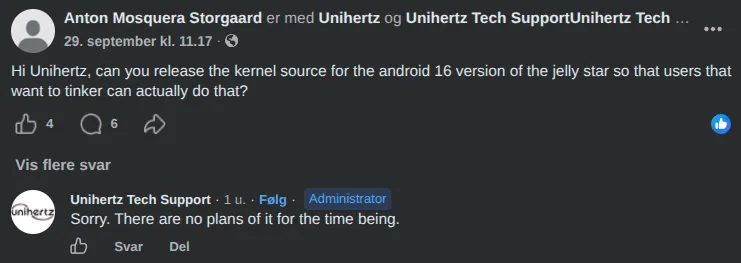
Whelp, now what? Unihertz apparently violates the GPL: they don’t honour the free software license of Linux, which Android is built on top of. In theory they can be sued for this, but as a Chinese company the chances of that ever happening are low.
So we’ve hit another dead end, right??
NO! At this point I refuse to give up. I spent a week’s worth of after-work free time, together with Claude Code, reverse engineering how the Jelly Star’s stock software is put together. I ended up keeping Unihertz’s own kernel as a prebuilt binary and building everything else around it.
I figured out that none of the fixes needed the kernel source or new firmware at all. The hardware was fine. Stock Android had simply hidden its configuration in the partitions that LineageOS replaces:
- Bluetooth: a handful of
bluetooth.profile.*settings that tell Android which Bluetooth profiles to start were missing, so headphones connected and immediately dropped. - NFC: the files that tell Android “this phone has NFC” were in the wrong partition, so the NFC service switched itself off at boot.
- LEDs: the SELinux labels that allow Android to touch the LED drivers lived in a partition we replace, and Unihertz’s own lights service only ever lights one colour channel, so I wrote a new lights app.
- Calls over 4G (VoLTE): MediaTek’s calling service and the libraries it needs lived in a system partition, so calls fell back to 2G until I brought them back.
So the kernel source turned out not to matter for the fixes. It does, however, block an official port (more on that below).
The result is an unofficial Jelly Star port of LineageOS 23.2 that you can download and flash yourself if you have a Jelly Star. Along the way I also got some extras working: notification, charging and incoming-call effects on the front and back LEDs, configurable actions for the red button, and a charge limit to spare the battery. Root (Magisk) and microG both work too, and microG needs no special build. Most importantly for me, my gym check-in and my public transport pass both work. Read the known issues first!
Try it yourself
Everything you need is below:
Known issues, downloads and install guide
Known issues
The full, up-to-date list is in STATUS.md in the repo. The important ones:
- Calls, SMS, 4G data and VoLTE work. VoLTE (HD calls over 4G) works on 3 Denmark; whether it works on your SIM depends on your carrier allowing it. Wi-Fi calling and video calling don’t work yet. MMS is untested on most carriers.
- Banking apps and contactless payments: expect many to fail. The bootloader has to stay unlocked, and the phone fails Google’s Play Integrity check completely (not even the basic level), rooted or not. Google Wallet tap-to-pay will not work, and apps that require Play Integrity, like some banking and payment apps, will refuse to run.
- Headphone jack: not detected on my unit. Stock firmware behaves the same on my phone, so it may be my unit, but don’t count on it.
- FM radio: doesn’t work (it needs a wired headset as an antenna, see above).
- Face unlock: not available. Fingerprint works.
- NFC: reading cards works, and so does my gym check-in. Other uses of the phone as a card may vary, and tap-to-pay won’t work (see above).
Before you start
- This wipes your phone, twice: once when you unlock the bootloader and again on the first install. Back up everything first.
- Never relock the bootloader with LineageOS installed, or the phone won’t boot.
- If anything goes wrong, MediaTek’s SP Flash Tool (v6) with Unihertz’s stock firmware is the way to unbrick the phone. Keep a copy of the stock firmware for your variant.
- The download contains Unihertz’s proprietary vendor images and firmware (camera, modem, audio drivers, etc.), not just open source code. Unofficial ROMs routinely redistribute these, but you should know it isn’t all open source.
- You do this at your own risk.
What you need:
- A Jelly Star updated to the latest stock firmware (V01.00.04)
- A computer with
adbandfastboot(Android platform-tools) and a USB cable - These five files from the GitHub release, all in one folder:
lineage-23.2-20261012-UNOFFICIAL-jellystar-signed.zip(LineageOS itself)boot.img,vendor_boot.img,dtbo.imgandvbmeta.img(they belong together;vendor_bootcontains Lineage Recovery)
Step 1: Unlock the bootloader
- On the phone, enable developer options: Settings → About phone, tap Build number 7 times.
- In Settings → System → Developer options, enable OEM unlocking and USB debugging. If your bootloader is already unlocked, OEM unlocking is greyed out; that’s fine. Just run
adb reboot bootloaderand go to Step 2. - Connect the phone to your computer and run:
adb reboot bootloader
fastboot flashing unlockConfirm the unlock on the phone with the volume keys. The confirmation prompt may not be visible on the Jelly Star’s screen; if so, follow Unihertz’s unlock instructions. This wipes the phone.
Step 2: Flash Lineage Recovery
With the phone still in the bootloader, flash the four images and boot into recovery:
fastboot flash boot boot.img
fastboot flash vendor_boot vendor_boot.img
fastboot flash dtbo dtbo.img
fastboot flash vbmeta vbmeta.img
fastboot reboot recoveryStep 3: Install LineageOS
- In recovery, choose Factory reset → Format data / factory reset.
- Go back and choose Apply update → Apply from ADB.
- On your computer, run:
adb sideload lineage-23.2-20261012-UNOFFICIAL-jellystar-signed.zipThe progress stops at about 47% and then prints Total xfer: 1.00x. That’s normal: the install has finished.
Recovery then asks “To install additional packages, you need to reboot recovery first. Do you want to reboot to recovery now?” Choose No, then Reboot system now. The first boot takes a few minutes.
Updating
The built-in Updater (Settings → System → Updater) downloads and installs new releases from GitHub and keeps your apps and data.
Source
The device tree is on GitHub: osquera/lineageos_unihertz_jellystar. It’s the build configuration, SELinux policy and the lights app that turn LineageOS into a Jelly Star build. The phone runs Unihertz’s stock kernel as a prebuilt.
So if you’re like me and want a
- cheap
- small
- smartphone
- without Apple’s and Google’s walled-garden bloatware
you can consider the Jelly Star with my unofficial port, or find your own device that actually fits your needs instead of an expensive phone full of things you don’t need. In hindsight, I also won’t buy phones from companies that don’t release their kernel source. It made this whole thing much more cumbersome, and I could have saved myself many hours by buying from a better company. Unihertz, you can go fuck yourselves.
Ultimately I think it is crazy that in 2026 it is this hard to control the software running on our own phones. It is also crazy that I was convinced the only good phones are iPhones and that I need an M-whatever chip and Liquid (Gl)ass. Marketing and peer pressure had me believing that for most of my short life.
These companies try (successfully) to convince us that a phone needs the power of a laptop and that we need 4K images and slow-mo video. Ask yourself: do I really need that? I don’t, and I don’t want a device as flashy and attention-grabbing as the iPhone I had. It feels really good to do something about it. Try it.
Addendum 1: How did I do it?
The short version: lots of reading logs. A few highlights:
- The 20-second boot loop. My first builds rebooted roughly every 20 seconds without ever showing anything. The cause: the stock boot configuration insists on mounting a partition called
system_dlkm, which my build didn’t include. No partition, no boot. - The duplicate SELinux property. Next, the phone died early in boot with no usable log over USB. It turns out the bootloader keeps logs of recent boots in a partition called
expdb, and reading those crash logs showed init aborting because one SELinux property (persist.vendor.pco5.radio.ctrl) was declared twice: once by Unihertz and once by the MediaTek policy I had pulled in. - Keeping stock’s vendor partition. I tried building the vendor partition (where the hardware drivers and services live) from extracted files, and it only ever got to the splash screen. So I gave up on that and ship Unihertz’s vendor partition unmodified. Audio, camera, sensors, NFC and the modem all worked straight away.
- Everything stock hid in the partitions we replace. The flip side of keeping stock’s vendor is that everything Unihertz stored in the system partitions disappears. That’s what broke Bluetooth, NFC and the LEDs (see above), and recovery too: Unihertz’s bootloader expects the recovery files laid out in a specific way, or it halts on every recovery boot.
Addendum 2: What’s next?
I thought about making an official LineageOS port, but LineageOS only accepts devices whose kernel is built from source, which we can’t do since Unihertz won’t release it. I still wanted to release this for any Jelly Star owners who want a working LineageOS 23.2. Also, I’m just a single person and I don’t want to commit to maintaining this. There might come an update down the road if I need it personally, but no promises.
With this setup I can make all kinds of fun modifications to the Jelly Star. I’m not sure what to try yet. The OS should be of service to the user and not get in the way, but being able to change the fundamental mechanics of the phone does make my inner tinkerer tingle.